There is something oddly satisfying about watching something get cut perfectly. A clean slice, a surprising reveal, or an object splitting in an unexpected way can turn a simple video into something people want to watch until the end. This 250+ AI Cutting Reels Free Download Pack brings together AI-generated cutting videos built around those satisfying moments.
The collection covers different objects, materials, food-inspired scenes, creative shapes, unusual items, and imaginative AI concepts. Some clips focus on clean and precise cuts, while others create unexpected reveals or impossible situations you would not see in an ordinary cutting video.
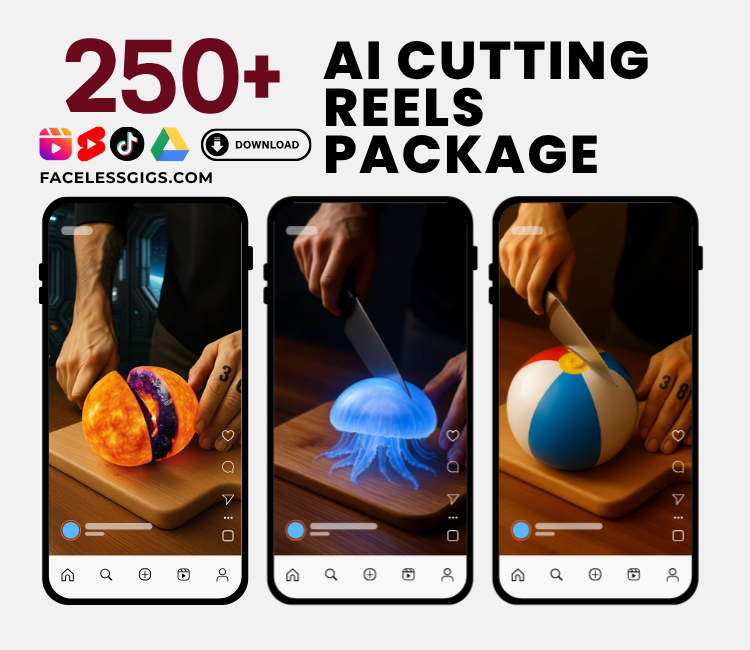
These reels work well for satisfying-content pages, AI creators, meme accounts, faceless pages, entertainment profiles, and short-form video creators. You can post suitable clips as they are or add captions, sound effects, music, voiceovers, and your own editing style.
The videos are AI-generated, so the scenes should be treated as fictional visual entertainment rather than demonstrations of real cutting techniques.
Pack Details
| Information | Details |
|---|---|
| Pack Name | AI Cutting Reels |
| Total Reels | 250+ AI-Generated Cutting Reels |
| Content Style | Satisfying Cuts, Creative Objects, Unexpected Reveals, AI Visual Experiments |
| File Format | MP4 Video Files |
| Video Quality | HD / Full HD |
| Download | Free Download |
| Delivery | Digital Files |
| Content Type | AI-Generated Short Videos |
| Reel Style | Satisfying, Cutting, Visual ASMR, Unexpected, Creative, Experimental |
| Featured Content | Objects, Food-Inspired Scenes, Creative Materials, Shapes, Fictional AI Concepts |
| Best For | Satisfying Pages, AI Creators, Meme Pages, Faceless Pages, Entertainment Accounts, Social Media Creators |
| Platforms | Instagram Reels, TikTok, YouTube Shorts, Facebook Reels |
| Editing | Compatible with CapCut, Canva, VN, Adobe Premiere Pro, and similar editors |
| Usage Ideas | Satisfying Posts, Reaction Videos, AI Experiments, Visual Content, Entertainment Posts, Daily Social Content |
| Skill Level | Beginner to Advanced |
| Collection Size | 250+ Ready-to-Use Reels |
| Cost | Free |
| Support | Contact us if you experience download issues |
Frequently Asked Questions
What type of cutting videos are included?
The collection includes AI-generated scenes featuring different objects, materials, food-inspired concepts, creative shapes, unusual items, and unexpected visual reveals.
Are these real cutting videos?
No. The reels are AI-generated visual scenes. Some clips might look realistic, but the scenes should be treated as fictional entertainment.
Why do cutting videos work so well as short-form content?
A cutting video creates anticipation. Viewers want to see what is inside, what happens after the cut, or how the final result looks. That simple curiosity makes the format well suited to short videos.
Are these reels suitable for satisfying-content pages?
Yes. Clean cuts, smooth movements, unusual objects, and unexpected reveals fit naturally into satisfying and visual entertainment pages.
Can I use these for an AI content page?
Yes. The collection gives AI creators a range of visual concepts for testing different hooks, captions, sounds, and editing styles.
Can I add sound effects to make the videos more satisfying?
Yes. Adding suitable sound effects, music, captions, or voiceovers gives you more control over the final presentation.
Can I combine several cutting clips into one video?
Yes. You could create themed compilations based on objects, colors, materials, food-inspired concepts, or the most unusual cuts.
Are the cutting scenes meant to teach real cutting techniques?
No. The videos are designed as visual entertainment. Do not rely on AI-generated scenes as instructions for handling tools, materials, or food preparation.
Can I use these reels on a faceless page?
Yes. The cutting action itself provides the visual focus, so there is no need to appear on camera.
Can I edit the reels before publishing?
Yes. You can add captions, transitions, music, sound effects, voiceovers, or branding with video editors such as CapCut, Canva, VN, or Adobe Premiere Pro.